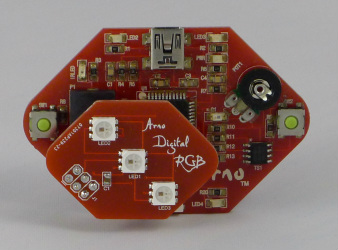
The Arno Digital RGB
Arno Digital RGB
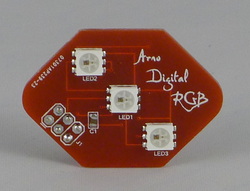
The first Arno Add-On is the Digital RGB.
It has three WS2812 RGB LEDs onboard. The WS2812 contains a micro version of the WS2811 RGB controller, built into the LED (see that tiny black dot?). These same LEDs come in strips of various lengths, so once you figure out the programming with this Add-On board, you'll be ready to deal with the power issues of the strips without having to wonder if you programmed it right.
The board comes with header that are compatible with the Arno and a set for connecting to other boards. It can be used as a small breakout board with your Arduino.
It has three WS2812 RGB LEDs onboard. The WS2812 contains a micro version of the WS2811 RGB controller, built into the LED (see that tiny black dot?). These same LEDs come in strips of various lengths, so once you figure out the programming with this Add-On board, you'll be ready to deal with the power issues of the strips without having to wonder if you programmed it right.
The board comes with header that are compatible with the Arno and a set for connecting to other boards. It can be used as a small breakout board with your Arduino.
How to use the Digital RGB Add-On:
The board uses the FastSPI_LED library, now updated to the FastSPI_LED2 library. This must be installed for the board to work.
Using WS2811 as the controller and pin 16 as the output (#define PIN 16), you will be talking to the LEDs in no time. The TM1809 profile also works.
The Arno will communicate with the first LED, LED1 in center, which passes info to LED2, and so on. Examples to be posted shortly.
A helpful post is at funkboxing for original library. New post for FastSPI_LED2
Using WS2811 as the controller and pin 16 as the output (#define PIN 16), you will be talking to the LEDs in no time. The TM1809 profile also works.
The Arno will communicate with the first LED, LED1 in center, which passes info to LED2, and so on. Examples to be posted shortly.
A helpful post is at funkboxing for original library. New post for FastSPI_LED2
Digital RGB Add On example

| demo_rgb_2.ino |
Instructable posted for Digital RGB Jack-O-Lantern
We posted an Instructable for an easy to build, programmable Jack-O-Lantern. It uses the old library, so make sure to mod to be libary of have the right one in your libraries folder.
The Add-On on an Arno